Optimising DAX: A Series Introduction


Optimising DAX queries in Power BI comes down to two things: how VertiPaq stores and compresses your data, and how the storage and formula engines work together to run a query. This series covers both: the model-design decisions you make before writing any DAX, and the query patterns that keep your reports fast.
Hello! This is the first in a series of posts about optimising DAX queries in Power BI. The content is based on a full-day workshop I attended at SQLBits 2026 by Alberto Ferrari of SQLBI. I learnt a huge amount about how the underlying engines that power Power BI work, and I wanted to write it all up partly to share it, and partly because I find that writing things down is the only way I actually retain them!
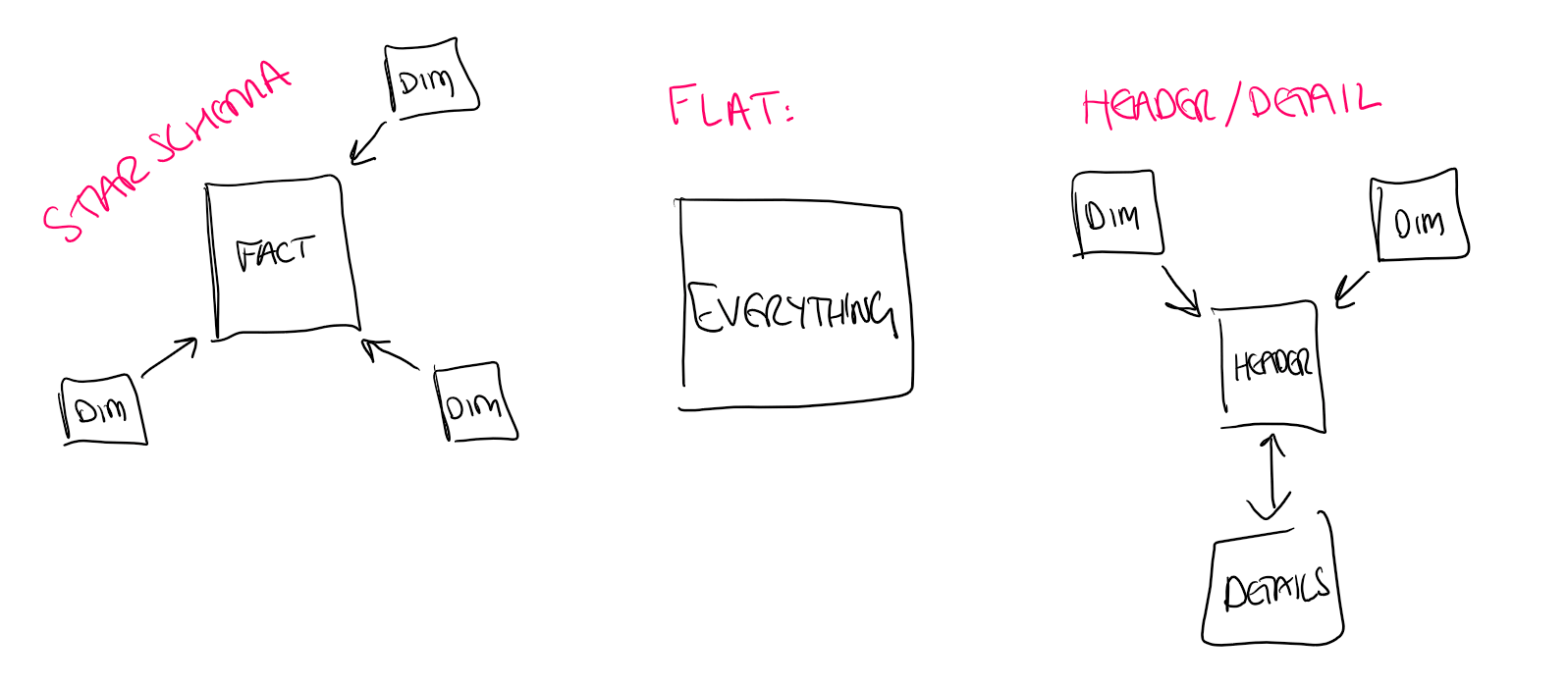
The series is split roughly into two halves. The first covers model optimisation - understanding how VertiPaq stores and compresses your data, and how the design decisions you make at the model level affect performance before you ever write a line of DAX. We look at three common model designs and compare how they perform:
- Star schema - dimension tables (customers, products, dates) linked to a central fact table. Generally the smallest and fastest.
- Flat table - everything denormalised into a single wide table. Actually compresses reasonably well because of all the repeated values.
- Header/detail - two fact tables (e.g. an Orders table and an OrderDetails table) linked by a primary key like OrderID. Spoiler: linking two large fact tables via their primary key is about the worst thing you can possibly do.
The second half covers query execution - how the two engines under the hood (the formula engine and the storage engine) divide up the work, what "data materialisation" means, and practical techniques for keeping your queries in the fast lane.
One thing Alberto stressed at the end of the workshop (and I think it's worth saying up front): at a lot of model sizes, these optimisations aren't worth the effort. Unoptimised DAX is often perfectly fine. These techniques become useful when you're working with larger datasets, hitting real performance problems, or operating under capacity constraints. That said, I do think understanding what's going on under the hood makes you write better DAX even when you're not actively optimising - so hopefully this series is useful regardless!

If you're looking to brush up on DAX fundamentals before diving in, we have plenty of content on the blog. My Learning DAX series covers the basics from filter contexts through to CALCULATE, and Elisenda Gascon's Evaluation Contexts in DAX series is another great starting point. Jessica Hill has written in depth about CALCULATE, context transition, and measures vs calculated columns. Her Performance Optimisation Tools for Power BI post is a particularly good companion to this series.