Optimising DAX: How VertiPaq Stores Your Data


VertiPaq is the in-memory, column-oriented database engine behind Power BI's import mode. It's the reason a million-row aggregation can come back in milliseconds, and it's also the reason a query that mixes several columns can suddenly feel slow. Both behaviours fall out of the same design choice: storing data column-by-column rather than row-by-row. Before we get anywhere near actual DAX, it's worth being clear on what that means.
Hello again, and welcome to the Optimising DAX series. In this post we're starting at the very bottom of the stack: how VertiPaq actually stores your data when you import it into Power BI.
I'll be honest - before attending Alberto Ferrari's workshop at SQLBits, I had a fairly vague mental model of "it goes into memory and is fast". Turns out there's quite a lot more to it than that, and understanding the storage layer is really the foundation for everything else in this series.
What is VertiPaq?
VertiPaq is the in-memory database engine that powers Power BI's import mode. When you import data into a Power BI model, VertiPaq is what's holding that data in memory and serving it up when your DAX queries ask for it.

The key characteristic of VertiPaq is that it's a column-oriented data store. This means that data is stored column-by-column, rather than the row-by-row approach you'd find in a traditional SQL database.
Why Column-Oriented?
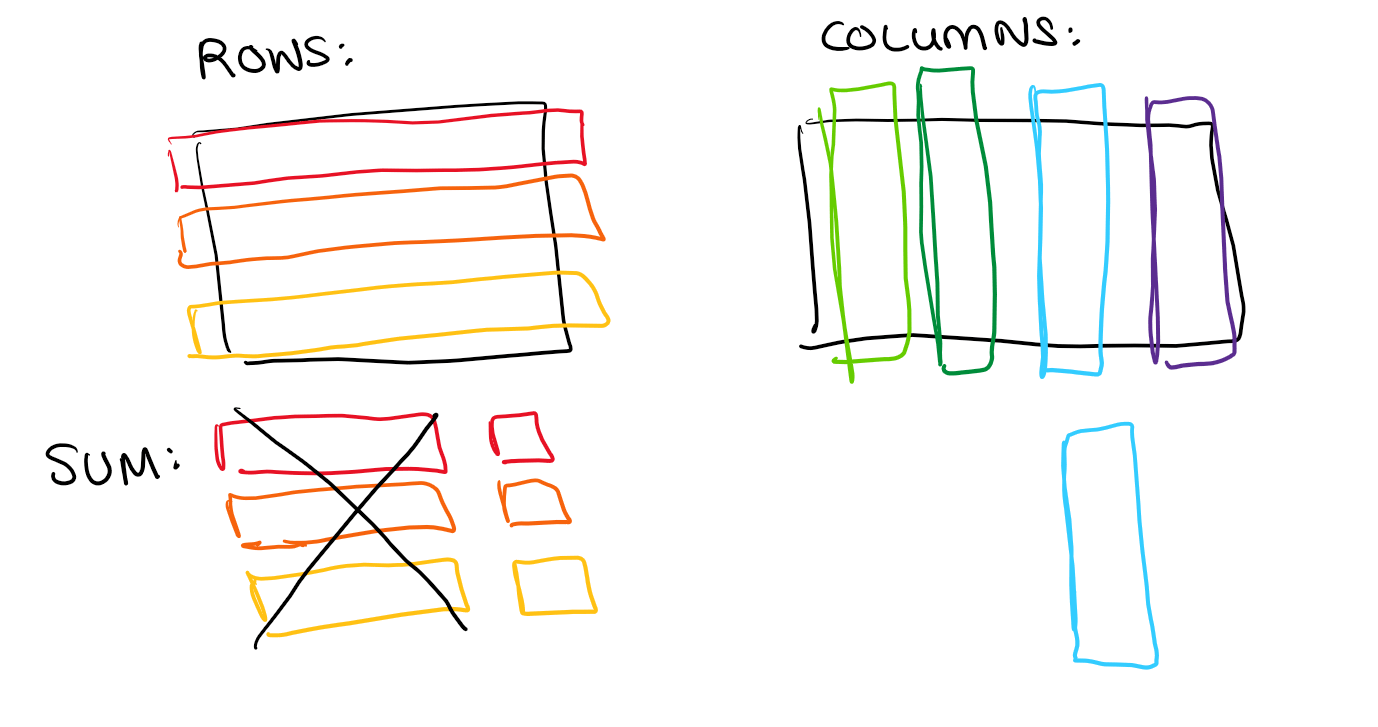
Imagine you want to calculate a SUM over a single column in a table with 20 columns and a million rows. In a row-oriented store, you'd have to read every row - all 20 columns per row - and then throw away 19 of them. You end up reading the full file but throwing away almost everything.
In a column-oriented store, you just read the one column you need. You can directly access the data without touching anything else, which makes reading an entire column (for, e.g., a SUM) incredibly fast.
The Catch: Cross-Column Operations
Column-oriented storage is brilliant for operations on individual columns, but it does add complexity as soon as you need relationships between columns.

A GROUPBY, for example, is more complicated than you might think. The engine has to read each column separately and build up some kind of index map to work out how the values relate to one another. It's a bit more work than just reading rows in order.
However - CPU is very cheap these days (a recurring theme in this series), so more complexity isn't necessarily an issue in practice.
Where things can genuinely break down is with more and more complex queries spanning multiple columns. At a certain point, the engine may just give up and rebuild the entire table from scratch - which is a big cause of slow queries. We'll explore this properly when we get to data materialisation later in the series.
What's Next
So that's the basic storage model - column-oriented, great for aggregations, less great for complex cross-column work. But we've skipped over something important: how does VertiPaq actually fit all this data into memory? The answer is compression, and that's what we'll cover next. Look out for the next post on encoding techniques!