Optimising DAX: Why Cardinality Matters


Hello again! In the previous post, we covered VertiPaq's three encoding techniques (value encoding, hash encoding, and run-length encoding) for compressing your data. From all of that, we can see that alongside the number of columns, the biggest factor in how much room your model takes up is the cardinality of those columns - the number of unique values.
Why Cardinality Drives Everything
Think back to the encoding techniques:
Hash encoding stores a dictionary of unique values. Higher cardinality means a larger dictionary, which means more memory.
Run-length encoding stores how many times values repeat in sequence. Higher cardinality means values change more frequently, so you get shorter runs and less compression.
So a column with 10 unique values and a million rows will compress brilliantly. A column with a million unique values and a million rows will barely compress at all.

And it's not just about memory. Scanning a high-cardinality column is slower too - there's simply more data to read through in the run-length encoded representation. If you do a SUM over a column with high cardinality, it will take noticeably longer than the same operation over a low-cardinality column.
Practical Ways to Reduce Cardinality
Some columns are naturally high-cardinality and you can't do much about it (primary keys, for example). But there are often easy wins hiding in your model.
Datetimes
Datetime columns are a classic culprit. A datetime with second-level precision across a few years can easily have millions of unique values. Some easy ways to reduce this:
- Split the date and time into separate columns - times are repeated each day, and dates will have far lower cardinality than the combined column.
- Reduce time precision - do you really need seconds, or would hours suffice?
- Remove the time entirely if it's not needed for your analysis.

Floating-Point Precision
Fix floating-point precision before import. A column of decimal values calculated to 15 decimal places has far higher cardinality than the same values rounded to 2 places. If your reporting doesn't need that precision, it's an easy win.
Pre-Aggregation
Group data prior to Power BI where you can. If you can aggregate in your ETL pipeline, you reduce both row count and column cardinality. This is particularly relevant if you're loading transactional data that could be summarised at a higher grain.
Finding Problem Columns
You can use DAX Studio to inspect your model size and identify "problem" columns with unexpectedly high cardinality or large memory footprints. You can do this by opening your Power BI report, opening DAX studio, and connecting to the model. If you then go on the "Advanced" tab and click "View Metrics", this will run the VertiPaq analyzer and give you your model statistics (number of columns, column sizes, cardinality, etc.).
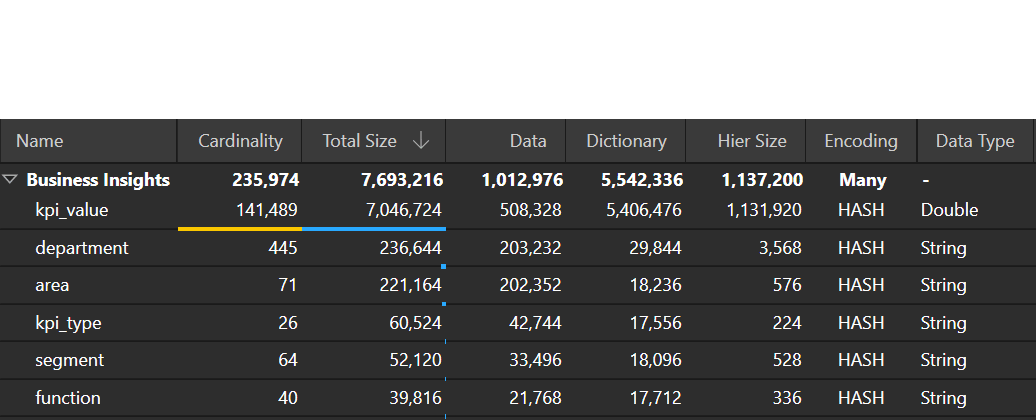
It's worth doing this periodically - you might be surprised which columns are taking up the most space.
What's Next
So cardinality matters a lot for compression and scan speed. But it also has a major impact on something else: the cost of traversing relationships between tables. Look out for the next post where we'll dig into that.