Microsoft Fabric variable libraries: best practices guide


At SQLBits 2026, I attended a session by Kevin Arnold on variable libraries in Microsoft Fabric. It was originally a 20-minute slot, but they let him continue into the break and he ended up speaking for around 45 minutes - which was a good thing, as there was plenty of ground to cover. Variable libraries are one of those features that seems straightforward on the surface, but getting the details right really matters - especially when it comes to protecting your production environment.
This post covers what variable libraries are, where you can use them, and some best practices that came out of the session (along with some thoughts of my own).
What Are Variable Libraries?
Variable libraries are Microsoft Fabric's intended mechanism for managing environment-specific configuration. If you've worked with configuration management in software development, this will feel familiar - think appsettings per environment, but for Fabric items.
The basic concept is:
- You define a set of variables with default values
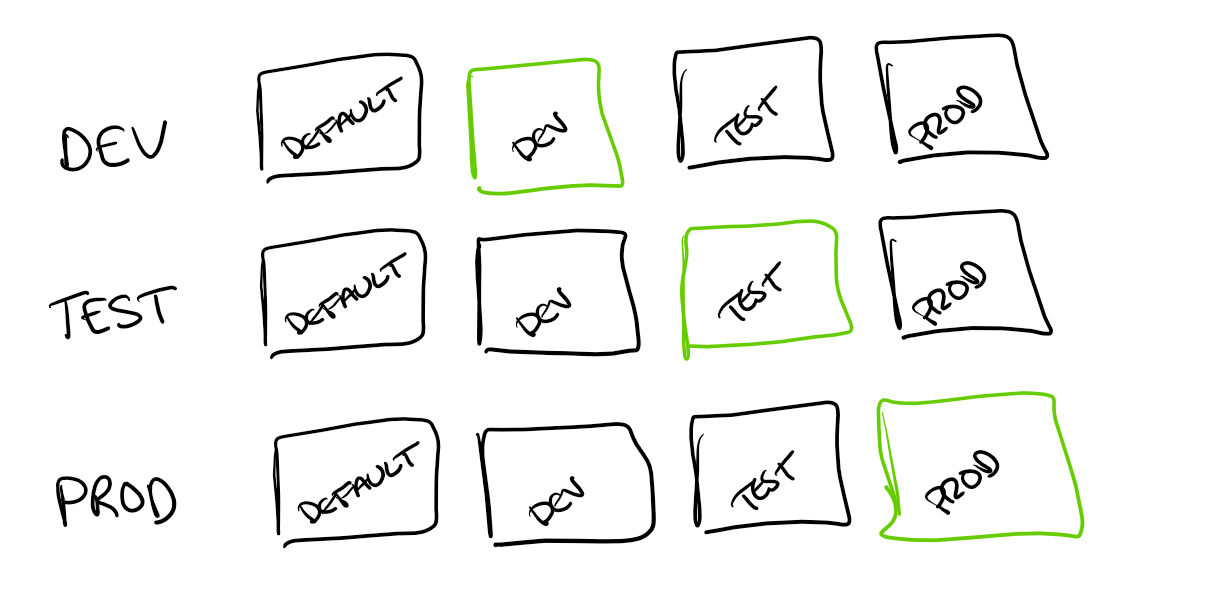
- You then create a variable set for each environment (e.g. Dev, Test, Prod)
- Each variable set needs to be "activated" for the environment it's deployed to

The variable values are all stored in Git, which means they're updated as part of your deployment process. However - and this is important - which variable set is activated for each environment is a separate concern. If you're using Fabric deployment pipelines, you can configure a different active value set per stage, which helps. But it's still worth being aware that activation and deployment are distinct steps, and getting them out of sync is a real risk.
Where Can You Use Them?
Variable libraries can be used across a range of Fabric item types:
- Lakehouse shortcuts - allowing your shortcuts to point to different storage locations per environment
- Notebooks - either directly with
%%configure(including setting the default lakehouse) or vianotebookutils - Data pipelines - for parameterising pipeline activities
- Dataflow Gen2 - support has been expanding here, with integration via
Variable.ValueandVariable.ValueOrDefaultfunctions in M code - Copy jobs - as source or destination
- User Defined Functions
It's worth noting that the variable values themselves are just stored as part of the Git-tracked configuration, so they can't contain secrets or sensitive information. For secrets, you'd still need to use a solution like Azure Key Vault.
A Best Practice: Don't Map Defaults to Real Environments
One of the most interesting takeaways from this session was around how you structure your variable sets. The presenter's setup had four sets: Default, Dev, Test, and Prod - where the Default set had clearly non-functional placeholder values.
This is in contrast to a pattern where you might map Default directly to your Dev environment, like: Default (= Dev), Test, Prod.
The problem with the latter approach is subtle but significant. If you deploy to an environment and the correct variable set hasn't been activated (or if activation is accidentally skipped), your Fabric items will fall back to the Default values. If Default points to Dev, you could accidentally end up reading from or writing to your Dev environment from a workspace that's supposed to be pointing elsewhere.
However, if your Default values are clearly non-functional placeholders (e.g. a connection string pointing to a non-existent lakehouse), then a missed activation would result in an obvious failure rather than a silent cross-environment issue. Failing loudly is almost always better than failing silently, especially when data integrity is at stake.

Of course, the ideal solution is to properly isolate your workspaces so that cross-environment writes aren't possible in the first place. But adopting the "non-functional default" pattern as an additional safety net is a simple and effective precaution.
Things to Watch Out For
There are a few additional things to be aware of:
SharePoint shortcuts can't currently use variable libraries. This is a notable limitation if you're working with SharePoint data across multiple environments. It's likely coming in a future update, but for now, it means you may need an alternative approach for environment-specific SharePoint integration.
Activation needs attention. While deployment pipelines do support configuring a different active value set per stage, the activation step is still separate from the deployment itself. Building in validation steps (e.g. checking which variable set is active as part of your deployment verification) would help mitigate the risk of things getting out of sync.
Git storage means no secrets. As mentioned, variable values are stored in Git, so anything sensitive needs to be managed separately. Combining variable libraries with Azure Key Vault is a good pattern for handling this.
Summary
Variable libraries are a welcome addition to the Fabric CI/CD story, providing a structured way to manage environment-specific configuration across a range of Fabric items. The key things to remember are: use non-functional default values as a safety net, be aware that activation is a manual step, and combine with Key Vault for any secrets.
I'll be keeping an eye on how this feature evolves - particularly around automation of the activation step and expanded support for item types like SharePoint shortcuts.