Running the Windows Phone Emulator in VMware Fusion

If you run Windows 8 on your Mac with VMware Fusion 5.0, you might get the following error message when starting the Windows Phone emulator for the first time:
The Windows Phone Emulator wasn't able to create the virtual machine: Generic failure under VMware Fusion 5.0
Here's how to fix this:
1. Stop the virtual machine that you are running the emulator on.
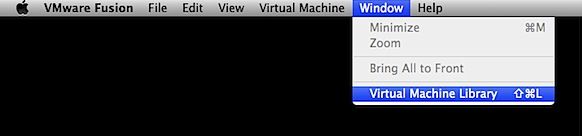
2. Open the Virtual Machine Library
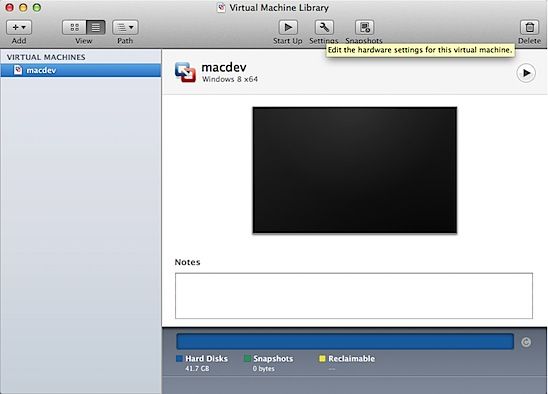
3. Select the VM in the list and go to Settings > Processors & Memory > Advanced Options
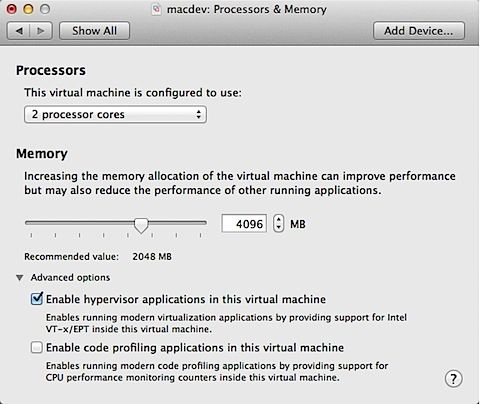
Tick the Enable hypervisor applications in this virtual machine checkbox to enable nested virtualization. This will add vhv.enable = "TRUE" in the VM configuration file (more on that below).
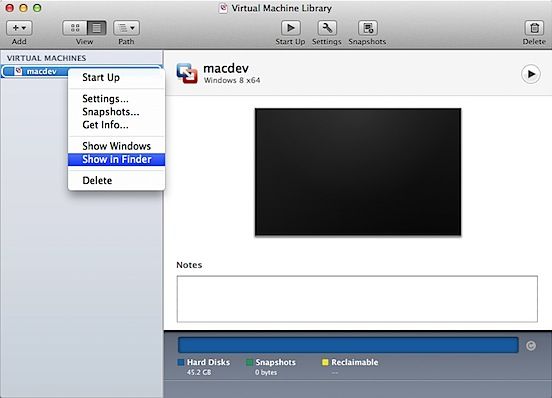
4. Go back to the VMs list and right-click on the VM and select Show in Finder.
5. In the Finder window, right-click and Show Package Contents.
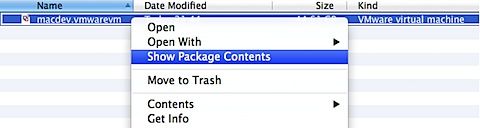
6. Once the content (list of files and folders) is displayed, find the VMware virtual machine configuration file - the file with the .vmx extension.
7. Open this file in TextEdit and add this line at the end:
hypervisor.cpuid.v0 = "FALSE"
7. Save and restart the VM.

Hopefully you should now be able to run the Windows Phone Emulator in VMware Fusion.
Why?
The Windows Phone Emulator runs as a virtual machine on Hyper-V. Hyper-V is a virtualization platform to create and run virtual machines. To check whether it is enabled on your Windows 8 instance, open the Windows Features settings:
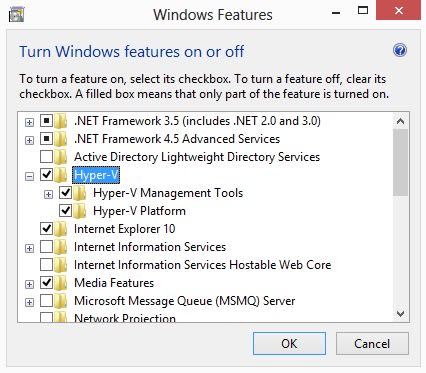
Because the Emulator requires hardware Hyper-V support, Hyper-V will check whether it is running in a virtualised instance or not. We therefore need to bypass this check by manually adding the option in the VM configuration file.
More details on the Emulator requirements at the Windows Phone Dev Center.
