Deploy a Vue app to Azure Static Web Apps using Azure DevOps & YAML


The newly GA Azure Static Web Apps are Microsoft's offering for hosting static web applications on Azure. This week I decided to migrate the VueJS web app that I've been building over to the new service.
The code repository is in Azure DevOps so I needed to set up an ADO pipeline to deploy the site. I decided, instead of using a classic release pipeline, to set it up using YAML.
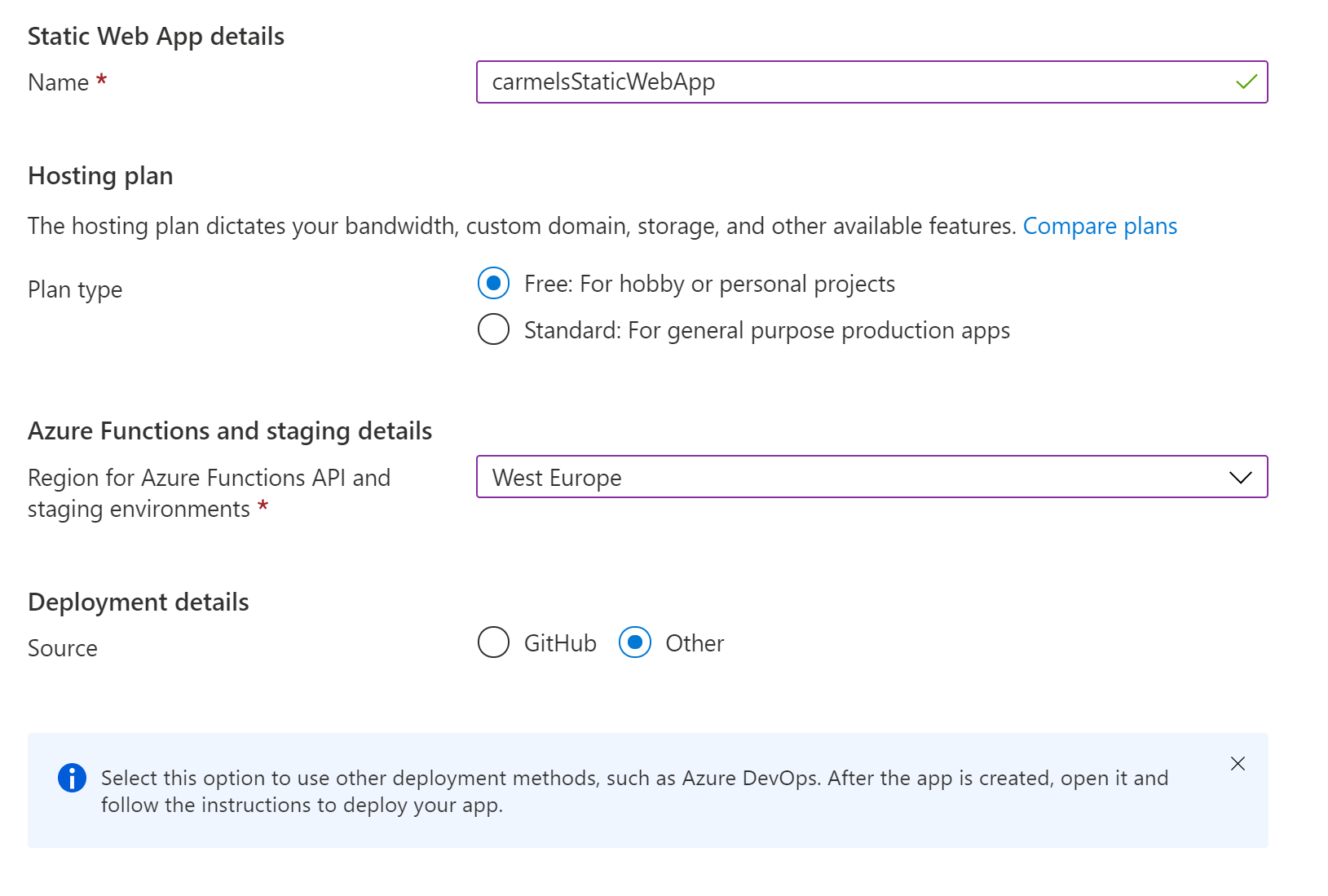
I first created a new static web app by hand via the portal.
As I was deploying the app from Azure Devops, I needed to select the Other option for the source:
There is currently support for creating a Web App using the CLI using the following command:
az staticwebapp create \
    -n <APPLICATION_NAME> \
    -g <RESOURCE_GROUP_NAME> \
    -s https://github.com/<YOUR_GITHUB_ACCOUNT_NAME>/<APPLICATION_LOCATION> \
    -l <LOCATION (e.g. westeurope)> \
    -b main \
    --token <YOUR_GITHUB_PERSONAL_ACCESS_TOKEN>

However, this assumes that you will be using a GitHub repository as the application source. Hopefully support for deploying a new (empty) Static Web App using the CLI will be coming soon!
Once I had created the Web App, I retrieved the deployment token:

Then, I set up a new pipeline in ADO and set the deployment token that I'd retrieved as a variable on the pipeline (called DeploymentToken).
The first two steps in the pipeline build the Vue app:
- task: NodeTool@0
  displayName: 'Install Node.js'
  inputs:
    versionSpec: '10.x'

- script: |
    npm install
    npm run build
  displayName: 'npm install and build'
  workingDirectory: $(Build.SourcesDirectory)/Solutions/WebApp
The script step first runs an npm install which installs all the necessary node modeules.
The npm run build command then builds the application (this generates the html pages, compiles the code, etc). Within my solution the web application project lives in the Solutions/WebApp folder so we set this folder as the workingDirectory.
The output of the build will end up in a dist folder within the project directory (Solutions/WebApp). And it is this output that we need to deploy.
To do this we use the AzureStaticWebApp@0 task which is defined by ADO, using the following inputs:
- task: AzureStaticWebApp@0
  inputs:
    app_location: 'Solutions/WebApp/dist'
    api_location: ''
    output_location: ''
  env:
    azure_static_web_apps_api_token: $(DeploymentToken)

Here we are using our DeploymentToken variable to tell Azure DevOps where to deploy the application.
We also provide an app_location which is the location of the code to deploy. In this case, this is the location of the build output from the previous step. Notice that the path to the application code is relative to the root of the solution, and does not need to be qualified with $(Build.SourcesDirectory) (this tripped me up for a while!).
This task will deploy the contents of the Solutions/WebApp/dist folder to the Azure Static Web App that provided the deployment token.
I left the api_location blank as I did not want to deploy an Azure Function as a part of the solution. Azure Static Web Apps support adding APIs to your Web Applications which are powered by Azure Functions. I didn't need to deploy Azure Functions as part of my application, but this api_location parameter is what you would use to provide the link to the code for your functions based APIs.
Note: At the time of writing there are quite a few constraints on the functions that are supported which are worth considering before deciding to host your APIs within you Static Web App!
Finally, the output_location is relative location that you want the output to be placed within your site (this could, for example, be a wwwroot folder). However, in this case I just wanted to place these files at the root of the site, so again I left this blank.
And that's it! By running the pipeline with the three above steps I was able to use Azure Devops to deploy my VueJS app as an Azure Static Web App.