Async Rx.NET - The journey to v1.0

Ian Griffiths discusses the Async Rx.NET project, the journey to get it ready for a v1 release and the impact of the new Runtime Async feature in .NET 11.
About this talk
.NET Conf 2026
Ian Griffiths, Technical Fellow at endjin, shares the latest updates on the Async Reactive Extensions for .NET (AKA Async Rx.NET). Support for async/await in Rx.NET was first released in 2023, but has remained in preview since then, with very few changes. But this project is finally moving forward again. This session will show Async Rx.NET in action, and the work we are doing to make it ready for use.
In this talk:
- 00:00 Introduction and agenda
- 00:47 What is AsyncRx.NET?
- 02:54 Demo: the async void problem in Rx.NET
- 08:02 Demo: fixing it with AsyncRx.NET
- 09:56 The history of AsyncRx.NET
- 12:08 Why progress stalled
- 13:58 A shared test suite for Rx.NET and AsyncRx.NET
- 15:46 Trying again with AI coding assistance
- 17:08 Demo: one test, two libraries
- 20:39 Runtime async in .NET 11
- 21:47 Lessons from using an AI coding assistant
- 23:12 What's left before a stable release
- 24:11 Other news: Rx 8, Intro to Rx playground and RxSpatial
- 25:54 Q&A: sync and async observers on the same observable
- 27:13 Q&A: when will AsyncRx.NET be stable?
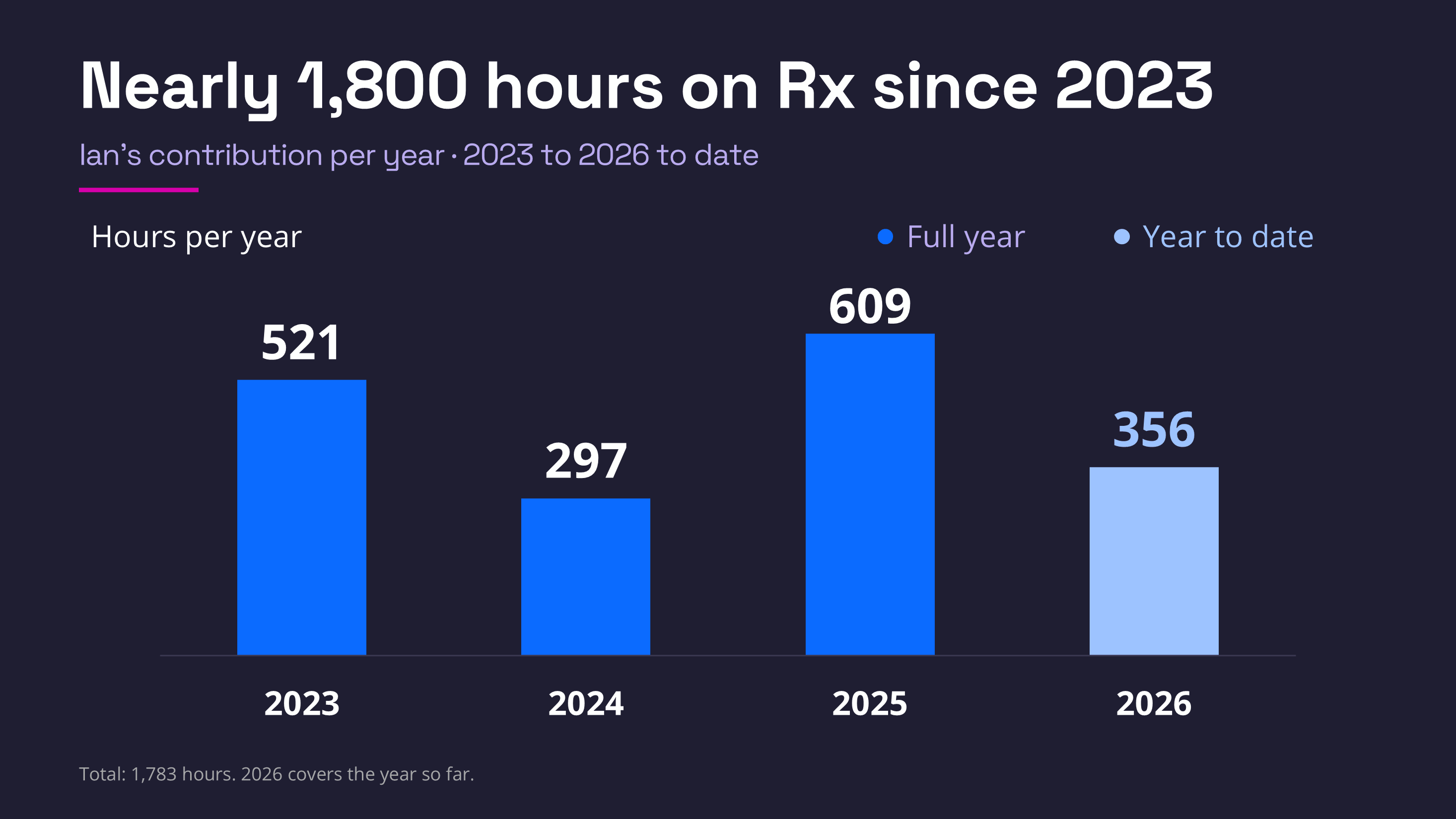
Ian has been working hard over the last few years to drive the Rx .NET project forward.
Read the transcript
So I'm gonna talk about where we're at with AsyncRx.NET, which is part of the .NET Foundation Rx.NET project, and what our future plans are. So I'm gonna begin with an explanation of what AsyncRx.NET is and why you might care about it. I'm gonna talk a little bit about the project history and the current status.
I'm gonna talk about the testing mechanisms that we've added to it. And these are crucial for enabling us to get to a level of quality where we're actually happy to ship. And I'm also gonna talk about how AsyncRx.NET can take advantage of new features in the .NET 11 runtime. And finally, I'm gonna talk a little bit about some learnings that we had with the use of AI coding assistance on this particular project.
So, to start with, what is AsyncRx.NET? Now, probably if you are listening to this talk, you are likely to already know what Rx.NET is, the Reactive Extensions to .NET, but just in case not, here's the one-sentence summary. Rx.NET is useful in any application where things happen. We have this abstraction called IObservable that represents a sequence of events of some kind.
So it can be, it's like an IEnumerable, it's a sequence of things. But unlike IEnumerable, the event source tells you when it's ready to offer you the next value. So if you have something like a sensor that's reporting data on its own schedule, or maybe some server that's sending you messages from time to time, an observable can say, I have some more data for you.
So it's a push-based mechanism. Now the big limitation that has always existed with Rx.NET since it was first introduced back in 2009, the very first preview came out, is that it's never supported await and async. And the only real way that a handler can say I'm gonna have to take some time to process this message is by blocking the calling thread, which is problematic in a lot of applications.
We generally don't want to do that. And so AsyncRx.NET adds the notion of an async observer. So when you subscribe to an observable source, you provide an observer object that receives the notifications, and an async observer, that's exactly what it sounds like. You are allowed to write asynchronous receivers in this model, and so you can use async and await.
Now, for this to work, we end up needing to have async kind of everything else. So for an async observer to exist, you need an async observable. So there's a new interface, IAsyncObservable. Also, the scheduling mechanisms that decide when to run things were all designed without async in mind.
So we have IAsyncScheduler as well, and IAsyncSubject, and so, on the whole, basically we've built an entire new library that is a reflection of the existing Rx library, but in async form. So I'm gonna show you that in action. Let me just get Visual Studio to the foreground. So I have here a simple test application, which is using Rx.NET.
If I go to the csproj, you can see that is the normal Reactive Extensions library, so not the async one yet. So I'm gonna show you the before and the after. So this particular project uses Azure Blob Storage. I've created the storage account, and just for illustration purposes, I'm gonna write some data up into a blob because that's the sort of thing you would typically want to do asynchronously.
Takes a little while for the message to reach blob storage, a few milliseconds maybe. And on a busy server, you don't really want to be blocking a thread while that happens. And so we tend to want to do these things asynchronously, and so this is a perfect example of the kind of thing that Rx has historically not handled all that well.
So, just as a sample data source, I'm using, I'm just reporting CPU load, I'm just recording the CPU load on my system into blob storage. And to do this, right now I'm using ordinary Rx. So the Observable class here is part of the Rx library, and it provides a Timer operation, which lets me say, gimme an event every five seconds.
The zero says don't wait for the first one, gimme that immediately, and then give me notifications every five seconds thereafter. This just produces values. It goes 0, 1, 2, 3, 4. I don't really care about those, so I'm then gonna discard that value and say, actually what I want to do is read values from the performance counter API to get the current CPU load.
And it so happens that when you do that, the very first reading that comes out is always zero. So I'm also using Rx's Skip operator to say, please discard the first thing that comes out and then give me everything else. And the result is an IObservable of float, and I can then observe that.
So this is all perfectly standard Rx usage, and I'm writing data into blob storage. However, you'll notice there's a squiggly here. Visual Studio has spotted that there's a problem. It said, well, you've got an async method call here, but you've not awaited it. So this is the code I showed you above that goes and writes into blob storage.
It's doing an await, it returns a task to say I might take some time. But the compiler's saying, yeah, but your method here is not async. And so that might be a problem. Now you might naively think, okay, fine, I'll just await it. And then the compiler will say, well, your method's not async, but that's fine.
We can mark it as async. And now the compiler's happy. However, there is a problem with this, and I'll show you what happens if I run this. So we kick this off. Starts to run. So you can see I've run this demo before. There's a bunch of blobs in there. Now we start to run and it's gonna observe the CPU load. Takes five seconds for the first event to come through, and here we are in our event handler.
So this is about to await, but if we look up the call stack one level, if I go up and say, well, let's look at the Rx library code calling me. Here it is. Well, that is not expecting to get a task back. This is not going to wait for the task that I'm working on to finish. This will immediately proceed to the next value without waiting for me to finish my work.
And we can see that actually in action. If I go on to say, well, let's do some more stuff. If I arbitrarily just wait for, actually, wait for six seconds because that's slightly longer than the interval between events. And then if I say, write a message to say that I finished handling the load. Watch what happens now when I run this.
I did not mean to do that in the debugger, so let me clear the breakpoints. Our first event will come through after five seconds of observing the load. So we get our notification, but we're not done yet. We're gonna wait another six seconds, but notice that that means the next event comes through before we finish processing the previous one.
We're now getting interleaved processing of events, and that's not meant to happen. One of the rules of Rx, one of the things that the library generally guarantees for you, is that it won't ask you to handle more than one thing at once. The whole model with an observer is you handle events one at a time and so you shouldn't have to deal with anything until you've finished with the previous thing.
But you just saw that we got the new second event coming in here before we'd written out the message saying we're done handling the first event, and that's because Rx wasn't expecting a task here, and actually this is a longstanding bugbear with the C# compiler, is that it has happily let me put async on a method that actually returns void.
The actual type of this lambda is, it's an Action, so it returns void. So there's nowhere for the task to go. It just kind of runs and gets forgotten about. That is not ideal. So this is the sort of thing that doesn't work right today in regular Rx, and it's why we have the new AsyncRx. So I'm gonna add a reference to the System.Reactive.Async library.
And now that I've got that in my project, I can say, well, rather than using Observable here, I can say I want AsyncObservable.Timer, and notice that nothing else needs to change. The programming model is basically exactly the same, except the Timer now returns an IAsyncObservable of long. And then my Select will turn that into an IAsyncObservable of float.
And then when I skip the first item, I still get an IAsyncObservable of float. Now, when you subscribe to an async observable, the subscription itself is allowed to take, is allowed to yield. So actually, there is no Subscribe method. There's a SubscribeAsync method. So I have to do that and I have to await it.
But now if I run this again.
So we wait for the performance counter to start up and then we subscribe to the events. And after five seconds we'll get the first one. And this time, because I'm using AsyncRx.NET, it knows I'm not done yet, 'cause I've returned it this task now, and it waits until we have said we're finished processing.
It waits until our event, our task, completes before returning back up to the timer. The timer's not gonna kick off its five-second interval until I've finished processing the previous event, and now I'm getting the strictly in-order processing that I'm supposed to get. So that's the basic idea. It's an almost identical programming model.
All the same operators are available. They all mean the same thing, but if you use an async callback, or if you implement IAsyncObserver yourself directly, then it actually recognizes the task that comes back out of that and behaves in the way you'd expect. So that is the basic idea of AsyncRx.NET.
So now let's look at where we're at with this project and why it's taken until now to actually get this thing close to release. Well, Rx itself, as I mentioned, was invented in 2000 and... It first shipped, so the first previews in 2009, the first full release was in 2011. C# didn't introduce the async and await keywords until 2012, and that's why Rx originally didn't support async and await.
It's because it wasn't a thing when Rx was invented. It came along later. But people started to ask for it because if you're doing async, if you're doing things that use Rx, you might well also want to use async and await, because they tend to sort of overlap in their usefulness. And so after a while, a preview of the async flavor of Rx was put up to GitHub.
Now, by this time, Microsoft had stopped really doing any development of their own in Rx.NET. The project had become completely community maintained. However, Bart De Smet, who was one of the original developers on the Rx team, very kindly donated this implementation of AsyncRx.NET and put it in the GitHub repo.
And then nothing much happened for about six years. So it was in there, but it was never actually published on NuGet, and that was mainly because the people who were maintaining Rx.NET didn't really have a great deal of time to devote to it. And so they were busy enough just keeping the main libraries up to date.
And so they never actually got around to doing a proper release of AsyncRx.NET. And actually, eventually even the releases of Rx were getting a bit few and far between, and people were starting to say, is this library dead? And so, back at the end of 2022, my employer, endjin, offered to take over maintenance of this project, and in 2023 we became the new maintainers, and in 2023 we did actually publish a preview of AsyncRx.NET onto NuGet.
And since then you've been able to use it. However, we have not since then. We've done two releases in 2023 and haven't done anything since. So the question then is, what happened then? Okay, so there's a few issues here. One of which is no one's paying us for this. This is the thing that endjin just sort of funds for the good of the community.
And for the most part it's just me working on this bit of it. We have some other people doing a few other Rx-related things, but most of the actual dev work on the main libraries is me, and I don't do this full time. I have to also do stuff that earns my company money. So we don't have a great deal of resource to spend on this, and we had other things to do.
We had to get the project building again on the modern development tools. It didn't actually build on the current Visual Studio when we took it over. We got a new release out of the door, bringing it up to date with the runtime versions. That was Rx version 6. Later on we did version 6.1 that introduced some new features from the community.
We also did a big revamp of the documentation. So the original author of the Intro to Rx ebook very generously let us take over that content and we updated that comprehensively to bring it up to date. And then Rx 7 released earlier this year. That was a very, very big deal. That took a lot of work to get going, for reasons I don't have time to explain right now.
But actually the biggest thing really stopping us pushing this further was that there was no test suite for AsyncRx.NET. For the main Rx.NET library, we have thousands of tests. Every operator has numerous tests for it. It's very comprehensively tested, but we've got absolutely nothing.
We had absolutely nothing testing AsyncRx.NET, which meant we were reluctant to put anything other than, like, an alpha label on it. And also, when people reported bugs, generally we like to create failing tests, reproduce the bug, and then demonstrate that we fixed it by making those tests pass. But if you don't have a test suite, you can't really do that.
So we were sort of stalled on making progress. So this is the big thing that we have made progress on. We now do have testing. So our plan was to have shared tests. We wanted a single test suite that is used by both Rx.NET and AsyncRx.NET. We wanted them to be on an equal footing from a test perspective.
Partly that was to avoid duplicating work. We've already got three or three and a half thousand tests for Rx.NET. We didn't wanna write the same number again for AsyncRx.NET. We also wanted consistency. We wanted the tests to say the same things for both libraries. And obviously we could have taken the existing library, cloned it, sorry, the existing tests, cloned them and then rewritten them to work against the async libraries.
That would've been the simplest thing to do, but the problem with that is that that then means the tests can drift apart, and we wanted the consistency to be kind of baked in forever. And also, really, we thought it was better to have the tests describe what Rx is meant to do without any reference to any particular implementation.
So that was the vision. So what was the reality? Well, we did get there, but it took longer than we had hoped. We did actually have an initial attempt to do all of this back in 2024. So I wrote a code generator in C# that used the Roslyn API to inspect the existing test suite and to generate async versions of those tests.
This, with hindsight, turned out to be an overly complicated way of doing it. There were all sorts of weird cases where you couldn't just literally translate stuff. So it was hard to get it working. There were loads of bugs in it, it was incomplete, and eventually we just stopped working on it 'cause it became clear it was not really the right way to do things.
This year we tried again, and the obvious difference between 2024 and now is that now we have AI coding assistance. Anthropic, very generously, were sponsoring open source projects. So they gave us free access to their models. So we used that to help move things along. And probably the single biggest contribution that the AI assistance made was to enable us to prototype many different ways of trying to solve this problem, because we had eight or nine different ideas about how we might do this.
And we'd already tried one and discovered that that was not actually as good an idea as it seemed before we started. So what we did was we just generated spikes for all the different ideas we had, so we could see what it would actually look like.
And that gave us a lot more information about what the best way to proceed was. And so we did all of those and then picked a winner, and then also got the AI to convert the existing test suite into that new form. This took about a month and a half, which is a lot quicker than the progress that we made with the attempt in 2024.
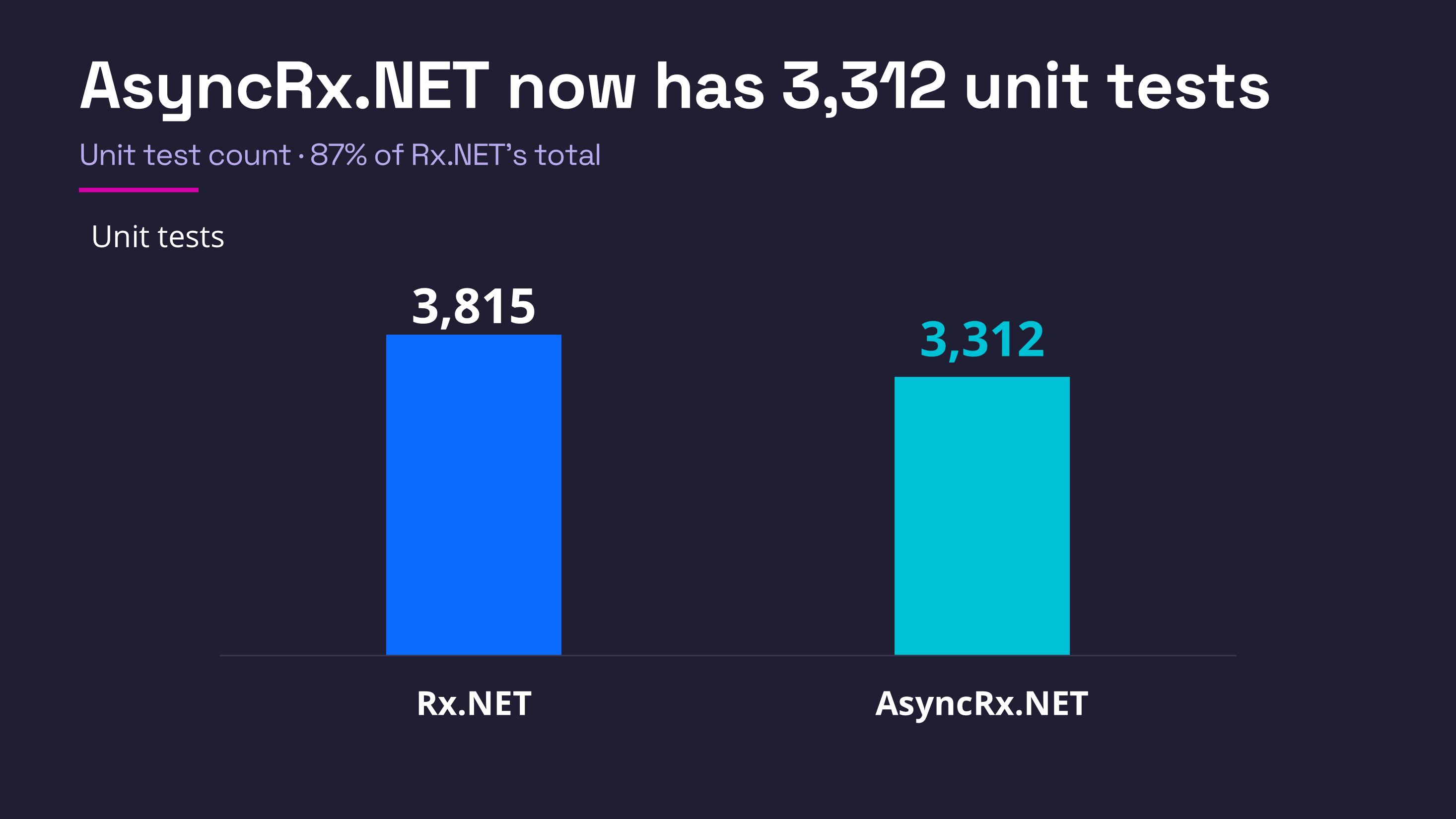
So we now have our shared test suite. We haven't dropped the existing Rx.NET test suite for now. Eventually we think we will, but for the time being, we do still have both, but the goal is to get rid of it eventually. But let me show you the shared tests in action. So this is a test from the new test suite.
Now, if you have ever looked at the original Rx.NET code base, this will look awfully familiar. Most of our tests look like this. We have a unit test that creates, that defines a series of notifications that will emerge from some observable source. It's all run on virtual time. We don't wanna run our tests in real time, partly 'cause it would take forever and partly 'cause it tends to make them unrepeatable.
So this says at 70 virtual ticks, please emit this value, at 150 virtual ticks, please emit this value, and so on. And eventually this particular source will say, I am done at that many ticks. By the way, if you're ever looking at these tests, it's useful to know that the subscription to these sources doesn't actually occur until 200 ticks in.
So these first two will actually go unobserved, and we do this deliberately 'cause it's useful to make sure that we can pick up on work that's already in the middle of things. So we deliberately arrange to skip the first few. So this is a virtual source. We then say, well, here's the actual subscription that we're gonna do.
This is the Rx Take operator. And then at the end of this, we get back a thing that tells us all of the messages that came out of that subscription. So we can see, do we get, and we can say, here is what we are expecting to see. And when we were expecting to see it, did we get that? And this will tell us if something else happened.
Also, we can say how many times was this subscribed to and when did the subscription start and end? So all our tests, basically, almost all our tests look like this. So this is almost identical to the existing one. However, if we go and look at it in the Test Explorer, where is it? Down there. So you can see, well, it's saying we've got about 23,000 tests.
That's slightly misleading because we run 'em all for .NET 10 and .NET 11. But also we run them all both for Rx.NET and AsyncRx.NET, and actually the AsyncRx ones, we run them both in a mode where we don't actually make any of the awaits really block, and another mode where we make all of them yield. Just different...
I debug the AsyncRx.NET one. You can see I am inside this AsyncObservable. This is part of the source code for the AsyncRx library. So we have indeed run the AsyncRx.NET Take operator. But if I run the test for the same name, but in this slightly different context down here, you'll see when we run this one, we actually hit a different bit of code.
We don't hit the... hang on. I should run the debugger. That will work better. When we run this one, we will hit this other piece of code. This is actually part of the test adapter layer that's then gonna call into the real Rx.NET library. So this is not AsyncObservable. Well, this is Observable. So the same test is able to run both libraries.
Now, I would love to explain in detail how that works, but it's quite complicated and I've only got half an hour. And I've used quite a lot of that already. So I need to return to my slides. But we will probably release a more detailed recording in the future explaining how it's done, but I wanted to talk about Rx.NET and .NET.
You are aware by now, one of the advances in the .NET 11 runtime is this thing called runtime async, where the runtime itself knows how to build the whole kind of state machine that manages the execution of async methods. And as you can imagine, this is of interest to the async flavor of Rx.NET.
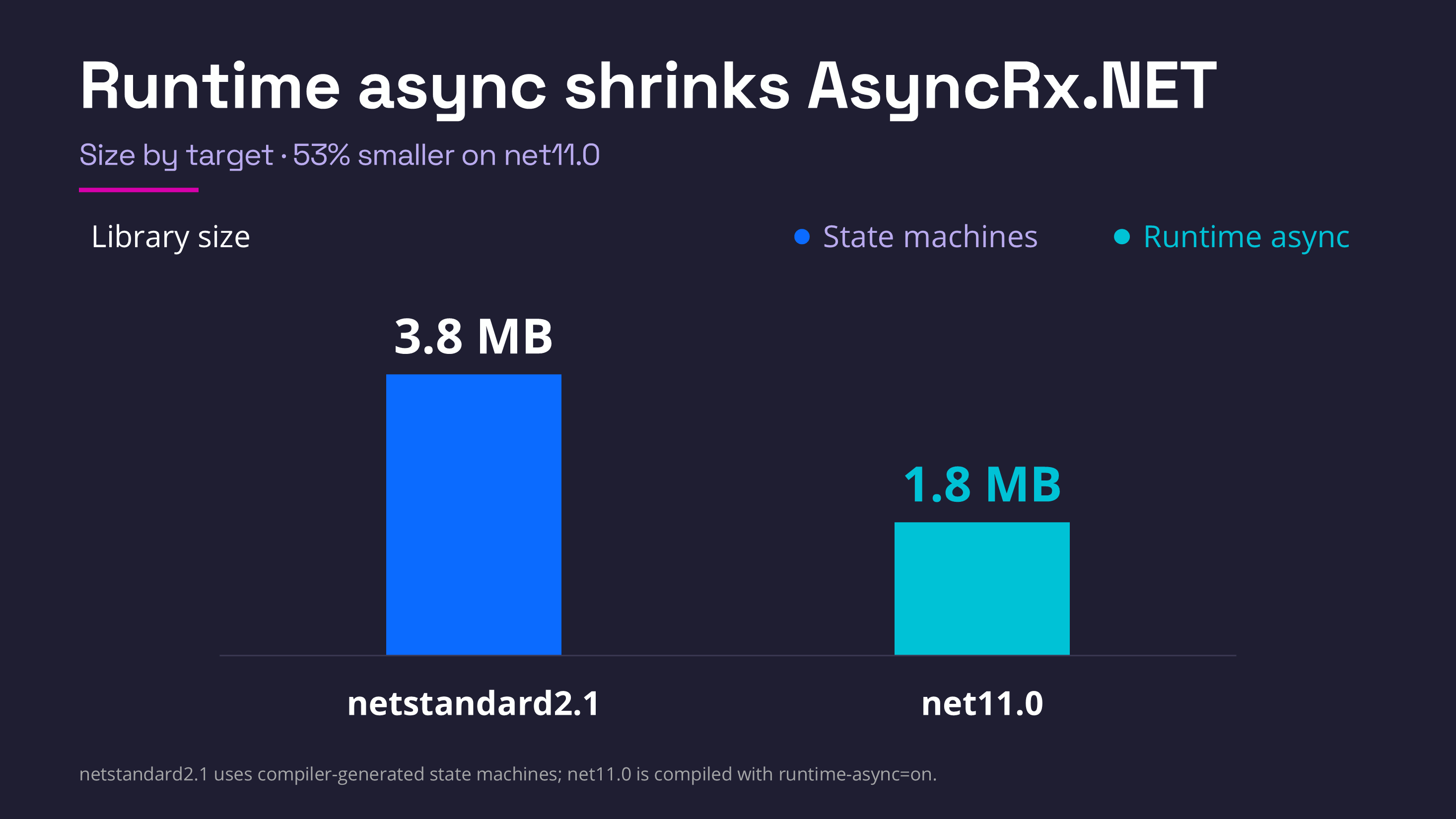
So up until recently, our Rx preview only offered .NET Standard targets because we didn't really have anything in there that took advantage of any particular runtime. But now we're gonna have a .NET 11 target, and the first obvious impact is on the size of the executable. So the .NET Standard one is just under four megabytes.
The .NET 11 build of the exact same code is less than half the size. It's 1.8 megabytes, so it's reduced a huge amount of code there. It's a big change in how much code gets built in there, and as it has been explained in other talks in this conference, there are runtime performance benefits to this, and so we get to take advantage of those by building for this new feature.
So one other thing I wanted to talk about with this process was what we have learned about the process of using an AI assistant. This is the first time we've really brought AI to bear on development in the Rx.NET repo. And like I said, the biggest benefit was that it enabled us to prototype a large number of different possible implementation strategies, and that would've taken us a very long time to do by hand, and it meant we were much better equipped to make a good decision.
So we didn't repeat what happened a couple of years ago where we went down a dead end. And also it did a lot of the work of the test suite conversion. It says one month there, it was more like a month and a half, but there we are.
The one thing I would say, though, is it required a lot of interventions. I basically had to intervene at least 80 times to tell it I wasn't quite happy with what it's doing. I frequently had to ask it, why have you done this that way? And it would often say, huh, no good reason. Probably not a good idea. Let's do it this other way instead.
You do have to watch these things like a hawk. But there's no doubt that it gave us a great big boost in actual productivity. The other thing to bear in mind is we also asked other models to review the results of the initial one, and they found further bugs.
But overall it was a big win. We would not be where we are if we hadn't been able to apply that. So, quickly, I wanna talk about what still remains to be done. So we can't do the final release until we've resolved some outstanding issues. There's still a few question marks over exactly what's gonna go in the public API surface area.
There are some design decisions which this testing process has thrown up. We know there are some bugs we've not fixed, and also we'd like the community to kind of play with it a bit more and let us know what they think. Once we've done the first proper release, the longer-term plan is for the AsyncRx code to move under the main Rx project.
Today, they're two completely separate parts of the repo. There's an Rx.NET folder and there's an AsyncRx.NET folder. And they're two separate projects. But we basically want AsyncRx to be just one of the things we ship as part of each Rx.NET release. It's just gonna be a feature rather than a separate thing.
And at that point, we hope to be able to retire the old Rx.NET test suite. One last thing. Just a bit of other news about what we are doing. In Rx, there will be an Rx version 8 coming soon. The main thing about that is just that we remove support for .NET runtimes that have themselves gone outta support.
So Rx 7 targets .NET 8. We're gonna bump that up to .NET 10. But we are also planning to add a .NET 11 target because there is async code, there is some async code in the main Rx.NET library. Obviously not as much as there is in AsyncRx.NET, but there is some async code, so we believe we will get some advantages by building a .NET 11 target specifically there.
We've also updated the Intro to Rx website a little bit, and we've got a new online playground where you can actually try out all the code samples that are in that site without having to download them and build them yourself. You can just use 'em in a browser. And also, we have recently released a library called RxSpatial, which I do not have time to talk about, but I suggest you go and follow that link if you have any interest in using something like Rx in the context of mapping applications or global information systems.
So that's an interesting project, but I'm nearly out of time, so thank you for listening, and if we have any questions, that would be great.
Eric Boyd: So, question from Dennis. What if there are both sync and async observers for the same observable? Like, why not create separate classes and not one observable with two methods?
Ian Griffiths: So the observers actually need, sorry, the observables need to be written differently to be able to work asynchronously. So the implementation of AsyncRx.NET is totally different from the existing Rx.NET one. And there are overheads to being async capable. Those overheads do go down on .NET 11, but not everyone's ready to move to that.
And in any case, they're not zero. So, in general, if you do not care at all about async, you don't really wanna be paying for it. Now, you can use synchronous observer methods with the new AsyncRx.NET library. So if you wanna have a source that supports both, then you can, but a lot of sources don't, are not able to cope with that.
And so, yeah, if someone's written a legacy observable source, they will not be in a position to deal with asynchronous observers because they won't know what they are. They'd have to rewrite them to handle it.
Eric Boyd: Makes sense. Another question here, from Jose. What is the expected timeline for System.Reactive.Async to move from alpha/preview to a stable GA? It's always timelines, right?
Ian Griffiths: Yeah. I was hoping to have an actual beta release today, but unfortunately there's an issue with authentication on the .NET Foundation login to Azure DevOps. It means I actually can't trigger builds right now in Azure DevOps, so that's slowing me down.
But that will be a beta release rather than a full release. We are hoping to be able to have this either the end of this year or early next year is the hope, but it will depend on how many bugs get reported once we release the beta.
Eric Boyd: Okay. Well, Ian, thank you so much. This session was great. I found it interesting hearing about the history of AsyncRx.NET and understanding the current state of it and like where you're going with it. And so that was really exciting. So thank you so much.
Ian Griffiths: Thank you very much for having me.
About the presenter
Ian Griffiths
Technical Fellow I
