Rx.NET v7 and Futures On .NET Live talk and demos


The On .NET Live team recently had me on as a guest to talk about Rx.NET v7 and future plans for Rx. You can see the talk here:
I showed some demos during the talk, and there was a request in the chat to make the source available. You can find the demos here:
https://github.com/endjin/rx-ondotnetlive-demos-2026
AIS.NET, Rx.NET and WPF
The first demo (source code at src/WpfAis) presents a map showing the current position of ships around the Norwegian coast:
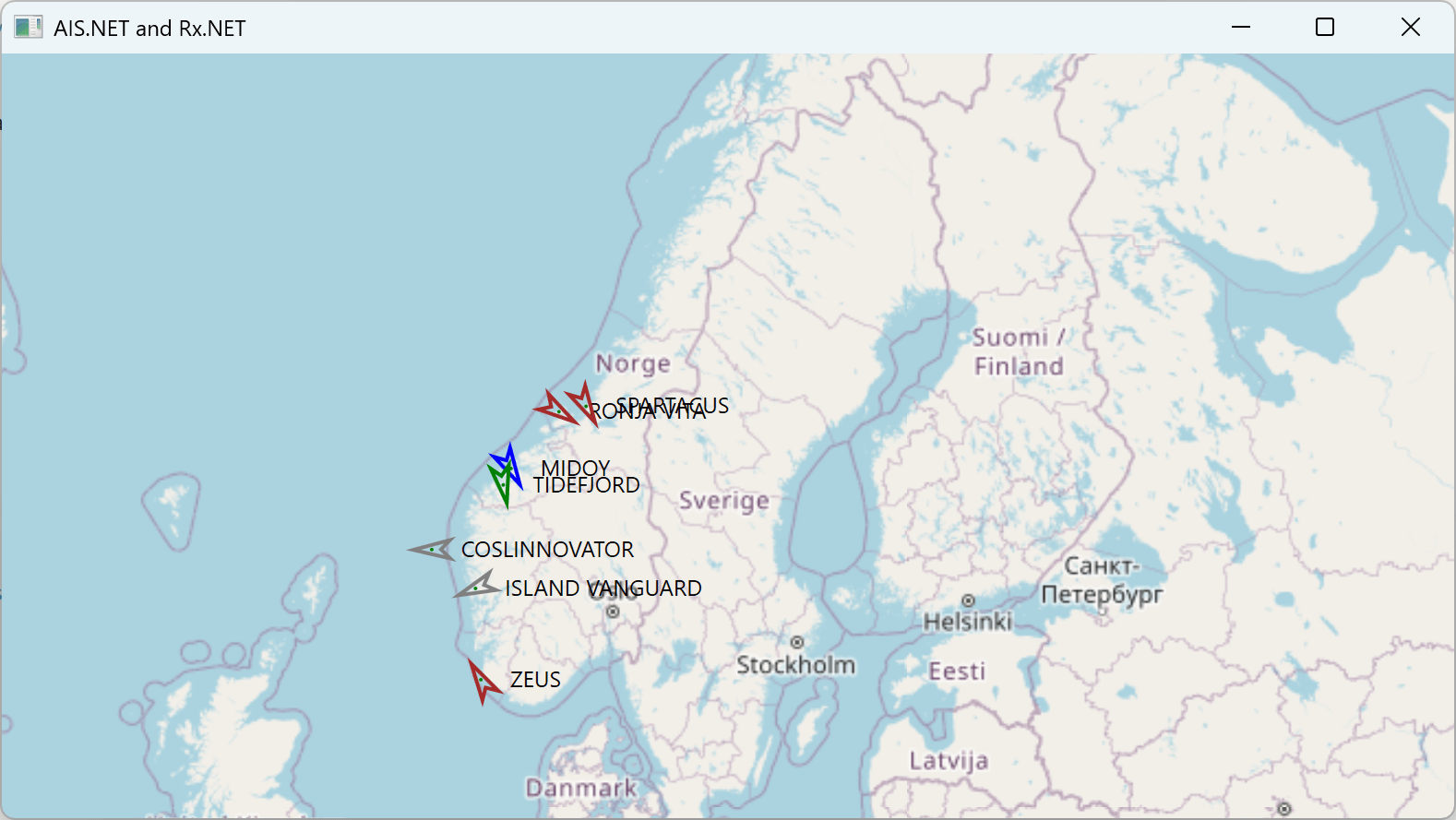
This uses a data source provided by the Norwegian government. They monitor AIS data broadcast by ships around their coast, and make these messages available on a public endpoint. Endjin provides an open source suite of libraries collectively called Ais.Net that can be used to process data of this kind. This example uses the Ais.Net NuGet package to process the raw messages. It also uses the Ais.Net.Receiver package to retrieve messages from the Norwegian government's service, and to present those through Rx.NET.
Endjin maintains AIS.NET. I last wrote about it in a recent blog post about the performance improvements .NET 10 has brought to this library.)
This example shows how Rx.NET can be used to process live data streams declaratively. In particular, this effectively performs a 'join' over two kinds of message. Ships broadcast their names and types in different messages from the ones they use to report their locations (because their name and type tends to change a lot less often than their location). But the UI wants to combine this information so that it can display the ship's name and type over its location icon in the map.
The demo's viewmodel expresses this declaratively in Rx.NET:
IObservable<IGroupedObservable<uint, IAisMessage>> byVessel =
    receiverHost.Messages.GroupBy(m => m.Mmsi);
var vesselNavigationWithNameStream =
    from perVesselMessage in byVessel
    let vesselNavigationUpdates = perVesselMessage.OfType<IVesselNavigation>()
    let vesselNames = perVesselMessage.OfType<IVesselName>()
    let shipTypes = perVesselMessage.OfType<IShipType>()
    let vesselLocationsWithNames = Observable.CombineLatest(vesselNavigationUpdates, vesselNames, shipTypes,
        (navigation, name, type) => (navigation, name, type))
    from vesselLocationAndName in vesselLocationsWithNames
    select (mmsi: perVesselMessage.Key, vesselLocationAndName.name, vesselLocationAndName.navigation, vesselLocationAndName.type);
This uses the C# query expression syntax to describe the processing we require. The Rx.NET library does all the actual work for us. (If you'd like more information about how this works, I've shown a version of this query before at this talk.)
System.Linq.Async, .NET 10, and System.Linq.AsyncEnumerable
During the show, I talked about how for many years, the de facto implementation of LINQ for IAsyncEnumerable<T> System.Linq.Async was not, despite how the name makes it look, an officially supported library. It has always lived in the Rx.NET repo, and when we at endjin took over maintenance of Rx.NET, that meant we also became responsible for LINQ to IAsyncEnumerable<T>! (See the announcement video for the old System.Linq.Async package for more information on the history behind this.)
With .NET 10, this is now finally built into the .NET runtime libraries. The System.Linq.AsyncEnumerable package (which is officially supported by Microsoft) is included as part of .NET 10.0 but is also available for use on older runtimes.
In the demo I showed how this creates a potential problem for projects already using System.Linq.Async. The project at src/SysLinqDemo targets .NET 8.0 and uses System.Linq.Async v6. If you upgrade the project to use .NET 10.0, you'll get errors about ambiguous definitions of the LINQ operators:
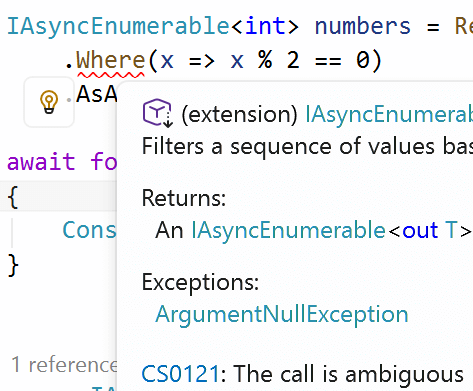
I showed that simply removing the reference to System.Linq.Async is the simplest way to resolve this. But I also discussed how you might not be able to do that because you might be using some other library that has a dependency on it. So I also showed how upgrading to the latest version of System.Linq.Async (v7) also fixes this problem.
Rx 7 and UI framework support
I discussed how our main goal with Rx 7 is to fix the bloat problems that have for many years afflicted applications that use Rx.NET in conjunction with self-contained deployment when targetting Windows. This table shows the impact this problem can have on a simple 'hello world' console app:
| Deployment type | Size without Rx | Size with Rx |
|---|---|---|
| Framework-dependent | 20.8MB | 22.5MB |
| Self-contained | 90.8MB | 182MB |
| Self-contained trimmed | 18.3MB | 65.7MB |
| Native AOT | 5.9MB | 17.4MB |
For framework-dependent deployment, in which the .NET runtime is presumed already to be available, adding Rx.NET has a relatively small impact. But for any of the other options, a reference to System.Reactive can double or even triple the size of the deployment! This happens when you target a Windows-specific TFM because System.Reactive ends up forcing your project to depend on both WPF and Windows Forms. You end up deploying a copy of both of those frameworks, which is what's taking up all the space here. The only way we can fix this is to split out UI framework support from the main System.Reactive package, putting these features into more specialized packages.
The effect of this change is that for the four deployment models shown, the impact of adding Rx becomes roughly 1.6MB, 1.6MB, unmeasureably small, and 300KB respectively.
To demonstrate what this will look like for developers, I showed a simple WPF application (in src/WpfWithRx) that uses Rx.NET v6, and which relies on its ObserveOnDispatcher method to ensure that Rx notifications are handled on a suitable thread for performing UI updates. I then upgraded the project to the preview of Rx 7 to show what developers will see when they do this:
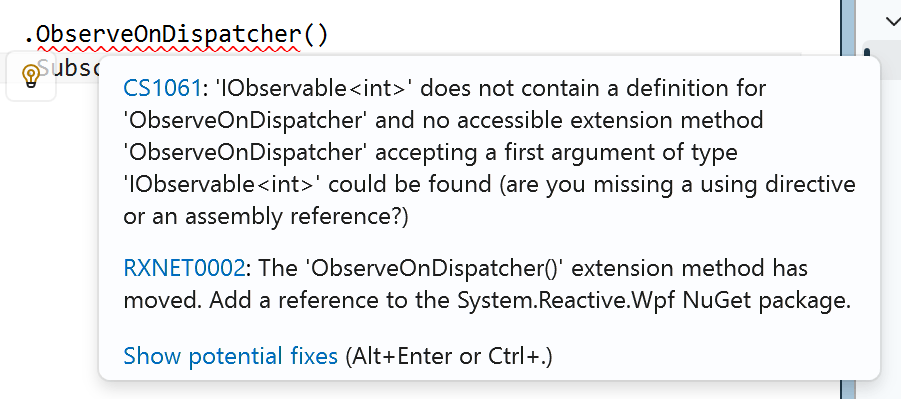
This illustrates that they will now get a build failure on code that expects UI framework support to be in the main Rx.NET package. But it also shows that Rx.NET v7 has an analyzer that detects this, and explains exactly how to resolve the problem. We hope this will make the transition relatively smooth for projects affected by this breaking change. (We also maintain binary compatibility—although the WPF and Windows Forms features have been removed from the public-facing API, they are actually still present in the runtime binaries.)
We've done this by writing a custom analyzer. (This is in the Rx.NET/Source/src/System.Reactive.Analyzers folder.) This is an extra DLL in the System.Reactive NuGet package that gets loaded by the IDE (Visual Studio, VS Code, or Rider will all find it). Analyzers inspect source code to find problems, and make suggestions for how to fix them.
(Ideally we would have supplied a Code Fix as well as an analyzer. The .NET SDK's analyzer mechanisms allow analyzers to propose code changes, which show up as 'fixes' suggested by the IDE. However, there isn't currently a good way for a fix to suggest changes to the .csproj file, which is what's required in this case. It seems that the only supported API for making the changes the fix would need to make is the old EnvDTE automation APIs offered by Visual Studio. However, that isn't available on other IDEs, so it wouldn't work on VS Code or Rider. And even in Visual Studio, there isn't a supported way for a code fix to get hold of that API. This surprised us a little, because these IDEs do actually make suggestions for adding NuGet package references in some other situations, but as far as we can see, there's no way for our analyzer/code fix to trigger that.)
Now that we've got an analyzer DLL built into System.Reactive, it would also be possible to start adding other analyzer rules: perhaps we could spot problematic coding patterns. If you have any ideas for common Rx issues that you think an analyzer could detect, please suggest them in https://github.com/dotnet/reactive/issues