OpenAPI Document Converters for Visual Studio 2017


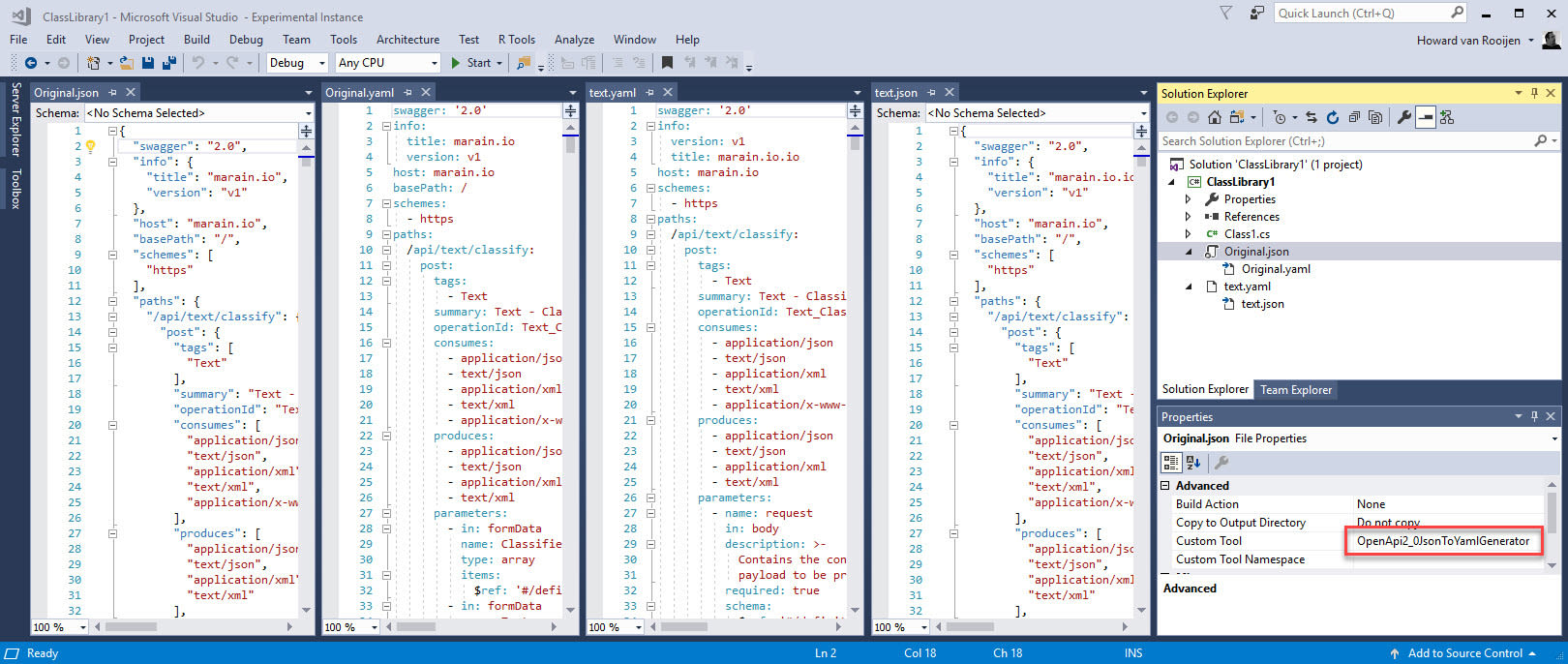
In my previous post I documented a technical spike I carried out to see how I could take the OpenAPI.NET SDK and create a Custom Tool in Visual Studio, in particular a Single-File Generator, that could be used to improve the Azure Functions v1 local development experience. Since then the OpenAPI.NET SDK reached v1.0 and while I was at BUILD I decided to spent a little bit more time productionising the solution. I've migrated the solution to its own GitHub repo - Endjin.OpenAPI.Converters, fixed issues around supporting the new Common Project System, and changed the Custom Tool names to make a bit more sense:
- to OpenAPI 2.0 JSON - Set Custom Tool to "ConvertToOpenApi_2_0_Json"
- to OpenAPI 2.0 YAML - Set Custom Tool to "ConvertToOpenApi_2_0_Yaml"
- to OpenAPI 3.0 JSON - Set Custom Tool to "ConvertToOpenApi_3_0_Json"
- to OpenAPI 3.0 YAML - Set Custom Tool to "ConvertToOpenApi_3_0_Yaml"
The primary usage scenario for this tool is the authoring of OpenAPI files in local Azure Function (V1) projects in the easier to maintain YAML format and automatically generating the required swagger.json file.
To add a OpenAPI document to your Function v1 project add the following folder structure

.azurefunctions\swagger\
Add a new file called swagger.yaml. On the property pane for this file, set the Custom Tool to equal "ConvertToOpenApi_2_0_Json". This will generate a swagger.json file.
Make sure you set the Build Action to "Content" and Copy to Output Directory to "Copy if newer" for the newly generated swagger.json file.
I've packaged up the extension into an easily installable VSIX package that can be downloaded from the releases tab on the GitHub repo. Please try it out and leave any feedback / issues on GitHub.
Special Thanks
- Darrel Miller & team for their work on the OpenAPI.NET SDK
- The TechTalk team as their SpecFlow.VisualStudio project really helped me understand some of the nuances of Visual Studio extensibility.
Useful Resources
- Have you heard of the In the Mood for HTTP YouTube show by Darrel Miller & Glenn Block?
- There is also a HTTP APIs Slack channel at http://slack.httpapis.com with discussions on most HTTP related topics such as OpenAPI / Rest / GraphQL etc