TeamCity and YouTrack: Office 365 for Email Notifications


If you host ALM infrastructure in Microsoft Azure Infrastructure as a Service, configuring email notifications can be a bit of a problem as you need a SMTP relay and there isn't one available in the Microsoft Azure Fabric (to combat spammers), however, if you also use Office 365, you can use their public SMTP relay.
First set up an email account you want to use to send the notifications. You'll have to follow the normal procedures and log in with the auto-generated password and set a new one, you will also have to remember to log-in and update the password on this email account as per the password expiration policy (unless you set them to never expire).
Full details of Office 365 POP and IMAP settings are available here.
TeamCity
To configure TeamCity, log-in as a user with Admin privileges and navigate to Administration > Email Notifier and enter the details as follows (substituting the email account details you created): :
YouTrack
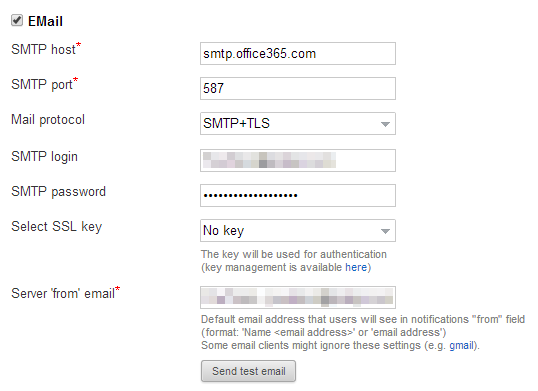
To configure YouTrack, log-in as a user with Admin privileges and navigate to Settings and scroll to the bottom of the page enter the details as follows (substituting the email account details you created):
Remember: work smarter, not harder!